Event Management for Weddings: A Practical System for Planning, Guests, and Suppliers
Event management for a wedding is the coordinated process of turning a couple’s plans into a reliable guest experience: collecting decisions, assigning responsibilities, communicating changes, and checking that each operational detail is ready at the right time. It is more than choosing a venue or creating a beautiful invitation. It connects the invitation to the RSVP, the RSVP to the caterer’s headcount, the schedule to the photographer, and the guest list to the right information.
For a wedding in France, that coordination often crosses several groups: the couple and their families, the venue, caterers, transport providers, musicians, photographers, and guests. Each group needs different information, at different moments, with different levels of access. A guest may only need the ceremony address and accommodation instructions. A caterer needs confirmed numbers and dietary requirements. A photographer needs the schedule, formal-photo window, and a contact person who can make decisions.
The practical objective is therefore not to put every detail in one enormous document. It is to create one dependable source of current information, define who can change what, and make the next action obvious. Kaatch is designed around this centralisation: invitations, RSVPs, guest information, budgets, schedules, photos, and communication can be organised in one online space, with tailored access for guests and service providers.
What Event Management includes in a wedding
Event management is a system of decisions and hand-offs. A wedding may feel personal and spontaneous to guests, but its smoothness depends on operational structure behind the scenes. The structure should answer five questions:
- Who is attending? Include each invited person, their response, their household, children, plus-ones, and any unanswered invitation.
- What does each person need? Record meal choices, allergies, mobility requirements, accommodation needs, transport plans, and language considerations where relevant.
- Where and when does each moment happen? Separate ceremony, drinks reception, dinner, speeches, dancing, transport, and accommodation check-in.
- Who is responsible? Assign an owner to supplier arrivals, payment follow-up, guest questions, seating, emergencies, and schedule changes.
- What happens when the plan changes? Decide how updates reach guests, suppliers, family members, and the person coordinating the day.
These questions describe the difference between a collection of wedding files and a working management system. A spreadsheet can store names. A shared calendar can store times. A messaging group can distribute announcements. None of those tools alone necessarily preserves the relationship between a guest’s response, their meal requirement, their table assignment, and the supplier who needs the information.
The four layers of a workable system
A useful wedding operation has four connected layers. The first is master data: names, contact details, household relationships, invitation status, and supplier contacts. The second is decisions: attendance, meals, accommodation, transport, and optional activities. The third is execution: tasks, deadlines, deliveries, setup, payments, and people responsible. The fourth is communication: what each audience is told, when they are told it, and where the latest version lives.
When those layers are separate, errors multiply. For example, a couple may update the ceremony time in a design file but forget the accommodation message. A caterer may receive the first guest count but not the later dietary update. A photographer may follow an old timeline saved as a PDF. Good event management creates a clear path from change to consequence.
Use the following distinction when deciding what belongs in the system:
- Reference information changes rarely: venue address, emergency contact, dress guidance, and access instructions.
- Live information changes as decisions arrive: RSVP status, meal counts, transport seats, and room allocations.
- Private information should not be visible to everyone: supplier fees, personal phone numbers, medical details, and internal notes.
- Public information can be shared broadly: arrival time, map link, ceremony etiquette, and the couple’s photo-sharing instructions.
This classification prevents a common mistake: treating every piece of information as if it should be displayed to every participant. A guest-facing page should be useful without exposing the couple’s budget or a supplier’s commercial terms.
Why coordination matters beyond the wedding day
Good coordination protects three scarce resources: time, attention, and trust. Couples have limited time to chase missing replies. Suppliers need accurate information to prepare. Guests need confidence that the details they received are current. When the system is unclear, people compensate with repeated messages, screenshots, phone calls, and personal notes. That creates more opportunities for contradictory information.
Guest certainty is an operational outcome, not merely a design preference. A guest who knows the exact ceremony location, arrival window, transport plan, and RSVP deadline is less likely to contact the couple with avoidable questions. This does not mean hiding the human element. It means reserving personal attention for questions that genuinely need it.
The cost of incomplete information
A missing response is not just an empty cell. It can affect purchasing, seating, staffing, transport, and the timing of final supplier confirmations. A dietary answer that says “special” without details is not actionable for a caterer. A guest who accepts the ceremony but does not answer about the evening meal may need a specific follow-up rather than a generic reminder.
For an illustrative planning policy—not a universal benchmark—a couple might define these internal states:
- Invited: the invitation has been sent, but no response is recorded.
- Opened: the guest has accessed the information, but has not completed the response.
- Responded: attendance and required questions are complete.
- Needs clarification: an answer exists but cannot be used operationally, such as “allergy” without an ingredient.
- Confirmed for suppliers: the couple has checked the current list and released the relevant count.
The value of these states is not their names. It is the decision attached to each one. “Invited” triggers a reminder at the chosen time. “Needs clarification” triggers a personal question. “Confirmed for suppliers” means later edits must be highlighted rather than silently merged into an old export.
Budget and coordination are connected
Event management also affects budget control. A late change can create a cost, but the cost may be invisible until someone links the decision to the supplier affected. An extra shuttle, revised menu, additional room, or longer venue access period should be recorded with its reason, owner, approval status, and financial impact.
Couples can use the Kaatch creative studio when they need help shaping the visual side of their wedding materials while keeping the wider organisational decisions in view. The important management principle is to keep creative assets connected to operational facts: the invitation should point to the current response process, not to a form that will later be abandoned.
For a 2026 wedding, a simple budget change record might include:
- the original item and agreed amount;
- the requested change and date;
- the supplier or person approving it;
- the new amount, marked as illustrative until confirmed;
- the effect on guest communication or the schedule.
This gives the couple a traceable decision without turning every planning conversation into accounting paperwork.
How a wedding Event Management system works
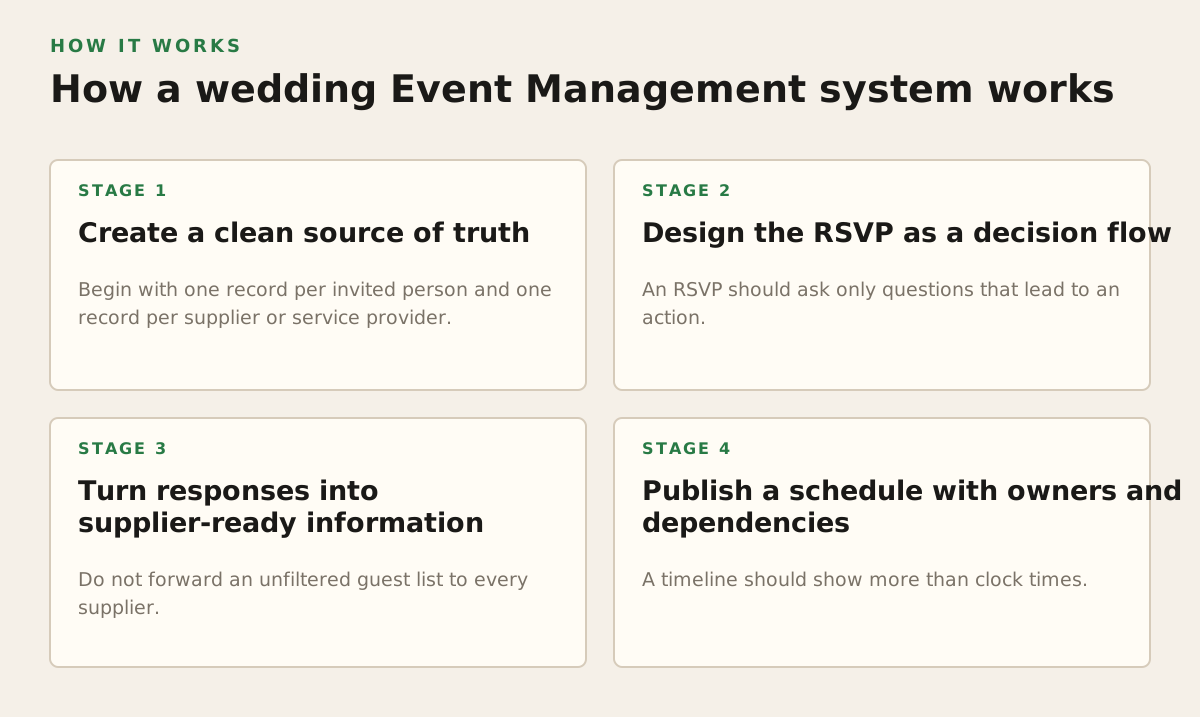
The system works when information moves through deliberate stages instead of arriving randomly in different channels. Start with the guest and supplier records, then collect decisions, validate them, publish the right information, and monitor exceptions. The order matters because every later action depends on the quality of the earlier record.
1. Create a clean source of truth
Begin with one record per invited person and one record per supplier or service provider. Avoid using a single text field such as “Marie and Paul” if you need to know whether each person accepted, selected a meal, or needs separate accommodation. Keep household relationships visible, but keep individual responses separate.
At minimum, the guest record should distinguish:
- full name and preferred form of address;
- household or invitation group;
- contact route and language preference, if relevant;
- ceremony attendance and reception attendance;
- meal choice and dietary clarification;
- accommodation and transport answers;
- response date and follow-up status.
For suppliers, record the service, lead contact, arrival time, setup requirement, access point, payment status, and the information they are authorised to receive. A caterer does not need the complete guest directory. A photographer may need the family photo list but not supplier invoices.
2. Design the RSVP as a decision flow
An RSVP should ask only questions that lead to an action. If the answer will not change seating, catering, transport, access, or communication, it may not belong in the first response. Too many questions increase abandonment and create vague answers.
A practical flow begins with attendance, then branches:
- Ask whether the guest will attend the ceremony.
- If relevant, ask whether they will attend the reception or next-day event.
- Ask about meal selection only for people attending the meal.
- Ask for dietary requirements, then request clarification when “yes” is selected.
- Ask about transport or accommodation only if those services are being arranged.
- Show the final summary so the guest can correct their response before submitting.
Branching questions reduce irrelevant work. A guest who declines the reception should not be asked to choose a dinner menu. A guest who is not using the shuttle should not be included in its seat count. The couple should still retain the original response and any later change, because a changed answer has operational consequences.
3. Turn responses into supplier-ready information
Do not forward an unfiltered guest list to every supplier. Convert responses into the specific output each person needs. The caterer needs a final number by meal category and a clear dietary summary. The venue needs access times, room layouts, and setup responsibilities. Transport needs pickup points, passenger names, and contact instructions. The photographer needs a timeline and a list of priority people.
| Recipient | Useful information | Information to withhold |
|---|---|---|
| Caterer | Confirmed covers, meal choices, actionable dietary requirements, service timing | Unrelated personal contact details, supplier pricing from other providers |
| Photographer | Schedule, family-photo groups, venue access, key contacts | Full dietary data, budget notes, unnecessary guest records |
| Venue | Arrival plan, room use, setup and breakdown responsibilities, accessibility needs | Private family comments or irrelevant RSVP notes |
| Transport provider | Passenger count, pickup locations, timing, day-of contact | Meal choices and unrelated supplier information |
This is role-based information sharing: the same underlying record produces different views. It reduces confusion and limits the damage caused by an accidental forward. It also makes follow-up easier because each supplier receives a concise operational brief rather than an archive of planning conversations.
4. Publish a schedule with owners and dependencies
A timeline should show more than clock times. Each important item needs an owner, a location, a dependency, and a fallback. “Flowers arrive at 10:00” is incomplete if nobody knows who receives them, where they are stored, or what happens if delivery is late.
For each operational item, record:
- time window, not just a single minute, where practical;
- responsible person and backup contact;
- location and access condition;
- required input, such as a guest list or floor plan;
- completion signal, such as a call, delivery receipt, or venue sign-off;
- fallback action if the original plan fails.
An event schedule should have a stable guest-facing version and a more detailed operations version. Guests need arrival instructions and major moments. The coordinator needs loading access, supplier phone numbers, setup order, and decision authority. Mixing both versions often produces either an overwhelming guest page or an under-specified run sheet.
5. Close the loop with communication
Every announcement should state what changed, who needs to act, and by when. “Important update” is weaker than “The ceremony now begins at 15:30; please arrive by 15:00 using the south entrance.” Keep the current version in one location, and use messages to point people there rather than creating multiple attachments.
For a 2026 communication plan, an illustrative sequence could be:
- invitation: core event details and response route;
- reminder: unanswered RSVP or incomplete dietary information;
- pre-event update: transport, accommodation, dress, and access details;
- final guest note: arrival window, weather contingency, and day-of contact;
- post-event message: photo-sharing instructions and any practical follow-up.
The timing should follow the couple’s actual deadlines and supplier commitments. A reminder sent before the response form is ready only creates more questions. A final message sent after guests have travelled is operationally useless.
Where wedding Event Management breaks
Most failures are not caused by a lack of enthusiasm. They come from ambiguous ownership, stale information, poor exception handling, or making the system difficult to use on a phone. A beautiful interface cannot compensate for an undefined decision.
Stale data and duplicate sources
The classic failure is having three guest counts: one in a spreadsheet, one in a caterer email, and one in a messaging thread. Choose a cut-off moment for each supplier output, then label later changes as additions or corrections. Never assume a new export automatically replaces the version already used for purchasing or seating.
A useful change log records:
- what changed;
- when it changed;
- who approved it;
- which supplier or guest is affected;
- whether a new message or document is required.
This is especially important for dietary information. “Vegetarian” may be sufficient for one menu and insufficient for another. Allergies, intolerances, religious requirements, and preferences should not be silently grouped together. Ask the caterer what level of detail is actionable, then phrase the RSVP question accordingly.
Too much access or too little access
Giving every supplier the whole guest list is convenient until a private note or personal phone number is shared unnecessarily. Giving suppliers no current information forces them to ask the couple repeatedly. The solution is not maximum restriction; it is minimum useful access.
In the European Union, organisations handling personal data must follow data-protection principles such as purpose limitation and data minimisation. The European Commission explains these principles on its official data-protection pages, including that personal data should be collected for specified purposes and limited to what is necessary: European Commission: data protection in the EU. The CNIL also provides the GDPR framework and guidance for organisations operating in France: CNIL: GDPR.
For a wedding, that translates into practical choices:
- ask guests only for information tied to a clear event need;
- explain why a sensitive question is being asked;
- avoid placing medical detail in a broadly shared spreadsheet;
- give suppliers the smallest relevant view;
- decide how long records, exports, and uploaded photos should remain available;
- make it clear who guests should contact about a correction.
These are operational safeguards, not legal decoration. They reduce accidental disclosure and make the couple’s responsibilities easier to explain to guests.
Unclear authority on the day
When something goes wrong, the question is rarely “Who has access to the file?” It is “Who can decide now?” A late delivery, missing guest, weather change, or transport delay needs a named decision-maker. Family members may be helpful, but several people giving instructions to suppliers can create a second event-management problem.
Define:
- the primary day-of coordinator;
- the backup if that person is unavailable;
- which decisions suppliers can make without approval;
- which decisions require the couple or designated representative;
- where urgent updates are posted.
Accessibility and device constraints
Guests may open an invitation on an older phone, with weak connectivity, large text enabled, or limited confidence using online forms. A process that works only on a laptop is not a robust guest process. Use readable text, clear labels, short pages, descriptive link wording, and a route for guests who need assistance.
Do not assume every guest can install an app or create an account. If access requires a code or link, explain what it is for and provide a human contact for problems. If a guest has limited digital access, a coordinator can enter their response after confirming it with them. The goal is accurate participation, not forcing every person through the same technical route.
How practitioners apply the system
Different participants use the same event-management foundation for different jobs. The couple protects the plan and makes decisions. The coordinator watches dependencies. The caterer turns responses into production requirements. The photographer protects the timeline and gathers visual context. Guests need confidence, not the whole operating manual.
For couples planning a French wedding
Start by mapping the event into moments, audiences, and decisions. Do not begin with a long feature checklist. For each moment, ask what guests must know, what suppliers must do, and what could change.
- List the event moments: ceremony, reception, dinner, party, accommodation, and any next-day gathering.
- Identify the decision deadline for each moment.
- Assign a person responsible for collecting and checking the answer.
- Define the guest-facing message and the supplier-facing output.
- Choose the final confirmation point before the day.
For an illustrative example, a couple might have 86 invited people, 74 expected for dinner, 6 requiring transport, and 4 dietary answers needing clarification. Those figures are a planning example, not a recommended threshold. The correct next actions would be to resolve the four unclear answers, confirm whether transport capacity covers six passengers, and give the caterer a clearly dated working count rather than forwarding the entire RSVP history.
For coordinators and venue teams
Illustrative example: Coordinators should manage exceptions first. A list showing 90% complete may still hide the one missing answer that affects the head table, the one mobility requirement that affects access, or the one supplier whose delivery conflicts with venue opening hours.
A daily or weekly review can sort items into:
- waiting for guest;
- waiting for supplier;
- needs couple approval;
- ready to publish;
- at risk on the day.
Use the venue’s own operational vocabulary. “South entrance,” “kitchen access,” “bridal room,” and “parking gate” are more useful than generic labels such as “location 2.” Give suppliers arrival instructions that account for real access constraints, including loading zones, restricted hours, stairs, lifts, and a person available to receive deliveries.
For caterers
A caterer needs a controlled hand-off, not a stream of informal updates. Agree on the format and timing of the working count, final count, meal breakdown, and dietary clarification. Separate confirmed requirements from assumptions. If a guest’s answer is incomplete, flag it rather than interpreting it without approval.
A practical catering brief might contain:
- total expected covers and the date of that count;
- adult, child, staff, and supplier meals where applicable;
- menu selections by category;
- specific ingredients or preparation constraints supplied by the guest;
- table-service timing and speeches that affect service;
- the on-site contact authorised to approve substitutions.
The couple should also know which changes are still possible and by what deadline. That prevents a guest-facing promise that the kitchen can no longer honour.
For photographers and photo-sharing workflows
Photographers need predictable access to the schedule, but they also benefit from understanding which moments matter most to the couple. A family-photo list should use names and relationships that the photographer can identify quickly. Include a gathering point and a person who can locate missing participants.
Guest-uploaded images add a second workflow. Tell guests where to share, whether uploads are visible to other guests, and what type of content is welcome. A post-event photo space can preserve informal moments that the professional coverage does not capture, but it should still have clear expectations about privacy and consent.
As a general data-management practice, the CNIL recommends thinking about the purpose and handling of personal data rather than collecting indefinitely; its official GDPR resource is a suitable starting point for French organisations and event teams: CNIL GDPR guidance. For a wedding, the practical question is whether photos remain open to uploads after the event, who can view them, and when the couple will archive or close the space.
For guests
Guests should not have to search through a long conversation to find the current address or response link. A good guest experience provides:
- a clear event summary;
- the next required action;
- travel, accommodation, and access information;
- a way to update an answer or request help;
- one current route to shared photos after the event.
When a calendar entry is offered, explain whether it is a personal copy or a live subscription. Google’s official Calendar help explains how calendar sharing and permission levels work, including the distinction between seeing availability and seeing event details: Google Calendar Help: share your calendar. That distinction matters when a supplier needs timing but should not receive private appointment information from a personal calendar.
A specific recommendation for a dependable setup
Use one central wedding workspace as the operational source of truth, then create audience-specific views from it. Do not try to make the invitation, RSVP form, supplier brief, budget file, and day-of schedule identical. Connect them through consistent names, dates, statuses, and ownership.
Before publishing anything, check these five controls:
- Every invited person has a clear response state, including a deliberate status for “not yet answered.”
- Every supplier receives a dated brief containing only the information needed for that service.
- Every major schedule item has an owner and fallback, not merely a time.
- Every sensitive field has a reason and access rule, with unnecessary data excluded.
- Every change has a communication path, so guests and suppliers know where the current version lives.
For couples, this approach reduces repetitive questions and makes late decisions visible. For coordinators, it turns exceptions into a manageable queue. For caterers, venues, photographers, and other providers, it replaces scattered updates with a brief that can be acted on. For guests, it creates a simpler path from invitation to arrival to photo sharing.
If you want those planning, invitation, RSVP, guest, budget, schedule, communication, and photo tasks connected in one online space, you can join Kaatch and organise access around the people involved. Kaatch is best used as the shared operational layer, while each supplier retains responsibility for the professional decisions within their service.
Start with the guest list and the next decision deadline, not with decoration or software settings. Once the source of truth is accurate, the rest of the event-management system becomes easier to coordinate, easier to explain, and more resilient when the plan changes.
Authored with NotFair SEO