Digital Invitation for a French Wedding: A Practical Guide for Couples and Planners
A digital invitation is more than an online version of a printed card. For a French wedding, it can act as a controlled information space where guests receive the right details, respond to the events they are invited to, share practical information, and return later for updates. The useful distinction is between a decorative announcement and a living invitation system: the first communicates a date, while the second helps couples, planners, caterers, photographers, venues, and guests coordinate the wedding before, during, and after the event.
What a Digital Invitation actually includes
A wedding digital invitation is a web-based or mobile-friendly invitation that combines event information with an action layer. Guests do not simply read the ceremony location; they may confirm attendance, identify accompanying guests, answer dietary questions, view a schedule, check transport instructions, and access a shared photo space. The invitation therefore has two jobs: present the event clearly and collect usable information.
That second job is where many invitations become operationally important. A printed card might ask a guest to return a response by post. A digital system can connect the response to a guest record, separate the ceremony from the reception, and show the couple which answers are still missing. The value is not the screen itself. It is the reduction of manual interpretation between the guest’s answer and the decision a wedding professional must make.
The four layers of a useful invitation
Think of the invitation as four connected layers rather than one page:
- Editorial layer: names, dates, welcome message, dress guidance, venue description, and the tone of the celebration.
- Decision layer: attendance, plus-one status, children’s attendance, accommodation needs, transport choices, and meal preferences.
- Logistics layer: event times, addresses, maps, parking, shuttle details, access instructions, and contact information.
- Participation layer: reminders, questions from guests, shared photos, and post-event communication.
These layers should not all be visible to everyone in the same way. A guest needs their own invitation and the events relevant to them. A caterer needs a reliable meal summary, not every personal message. A photographer needs the schedule, venue access details, and potentially guest-uploaded images, but not necessarily private dietary notes. A planner may need the broadest operational view.
For that reason, a digital invitation should be designed around roles and permissions. Before choosing a format, list who needs to see or change each category of information. This is a more useful exercise than beginning with colours, animations, or a template.
| Audience | Useful information | Action required |
|---|---|---|
| Couple | Guest status, answers, budget notes, schedule, messages | Review missing responses and approve updates |
| Guest | Personal invitation, event details, practical guidance | RSVP and update relevant answers |
| Caterer | Confirmed headcount, children, dietary requirements | Receive an agreed summary by a stated deadline |
| Photographer | Timings, locations, access notes, shared images | Coordinate coverage and collect selected photos |
| Venue | Arrival plan, room use, guest flow, supplier contacts | Confirm operational details with the planner |
The format can be elegant, but elegance should support comprehension. A guest who cannot tell whether the ceremony starts at 14:00 or whether the reply concerns the whole weekend has received a beautiful failure. In practice, the best invitation answers three questions immediately: What am I invited to? What do you need from me? Where do I find the latest information?
Why the invitation matters after the announcement
The main benefit is not eliminating paper. It is creating a single working version of the guest information. Wedding details change: a ceremony room moves, a shuttle departure is adjusted, a child is added to a family’s response, or a menu question needs clarification. If the update lives in a group message, an old email, and a spreadsheet, different people act on different versions.
A central invitation gives the couple a place to publish the current answer. It also creates a clearer boundary between confirmed information and informal discussion. That distinction matters to service providers. A caterer can prepare from an approved count; a venue can use the agreed schedule; a photographer can plan around the latest ceremony and cocktail timings.
RSVP data is operational data
RSVPs are often treated as a courtesy response, but they are really a set of planning variables. A useful response form should ask only questions that lead to a decision. For example, a couple may need to know whether a guest attends the ceremony, the reception, the next-day brunch, or none of these. They may also need the number of adults, the number of children, dietary restrictions, and transport requirements.
Do not confuse more fields with better information. Every unnecessary question increases hesitation and creates answers that someone must interpret. A good form uses conditional questions: a guest who declines the wedding should not be asked to choose a shuttle seat, and a guest who is not invited to the brunch should not see the brunch menu question.
For an illustrative starting policy, a couple might set the following sequence:
- Send the invitation six to eight weeks before the RSVP deadline, adjusting the timing for destination travel and the formality of the event.
- Ask for attendance at each relevant event rather than one vague “coming?” response.
- Send one friendly reminder to guests with no answer and a second personal follow-up only where the missing answer affects suppliers.
- Freeze the caterer’s working count on a stated date, while recording later changes separately rather than silently replacing the approved version.
- Give the planner and caterer the same dated summary so that a number can be traced to a specific update.
Those timings are not universal rules. They are an illustrative workflow that should be adapted to the venue contract, catering deadline, travel arrangements, and the couple’s communication style.
Better access for guests
Guests rarely experience an invitation under ideal conditions. They may open it on a small phone, have a weak connection, use a browser they do not normally use, or need help from a relative. Accessibility is therefore part of hospitality, not a specialist afterthought. The W3C explains accessibility as designing websites and tools so people with disabilities can perceive, understand, navigate, and interact with them; its introductory guidance is available at W3C’s accessibility fundamentals.
Practical choices include:
- Use readable text and strong contrast instead of placing essential details over a busy image.
- Write dates with the month spelled out, especially when guests may interpret day and month differently.
- Keep buttons descriptive: “Confirm reception attendance” is clearer than “Continue”.
- Make the key information available without requiring a video to load.
- Provide a contact route for guests who cannot use the form comfortably.
- Test the invitation on a phone and with enlarged text before sending it widely.
French and international guest lists also benefit from explicit language choices. If some guests are more comfortable in English, provide the essential logistics in both languages or identify a person who can answer questions. Translation is not just a courtesy: a misunderstanding about a venue entrance or transport departure can create a real event-management problem.
How to design the information and response flow
Start with the event structure, not with the page design. A wedding may include a civil ceremony, religious ceremony, cocktail reception, dinner, late-night gathering, and next-day brunch. These are not interchangeable blocks. Different guests may be invited to different parts, and each part may require different information.
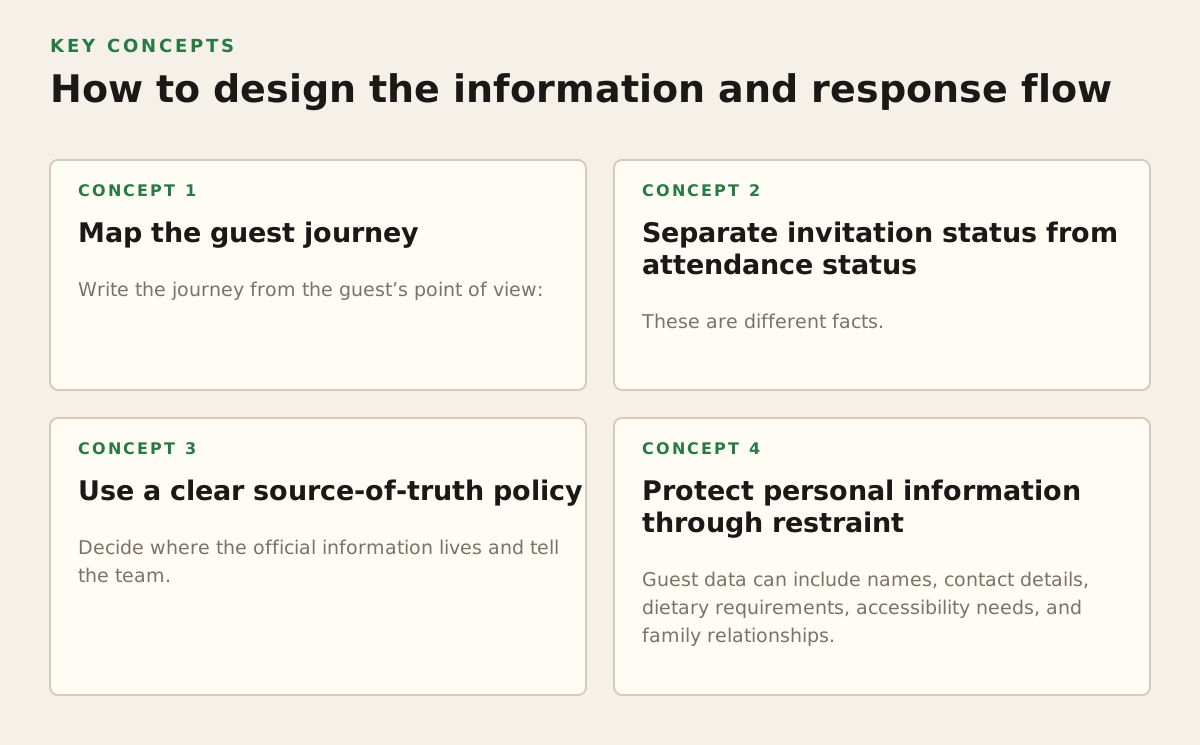
Map the guest journey
Write the journey from the guest’s point of view:
- They receive the invitation and understand why it applies to them.
- They identify which events they are invited to attend.
- They open the venue and transport information.
- They submit an RSVP with only relevant questions.
- They receive confirmation of what they selected.
- They return later for updates, directions, or contact details.
- After the wedding, they access the approved photo-sharing space.
At each step, define the failure that must be prevented. If guests may confuse two venues, show the town and event name beside each address. If several family members share a surname, include the individual names invited. If one person is answering for a household, make clear which guests are covered by that response.
The form should produce data that can be counted without guesswork. A free-text field saying “vegetarian, maybe bringing my daughter” is not equivalent to separate fields for meal preference and child attendance. Free text still has a place for allergies or explanations, but it should not carry the entire structure.
Separate invitation status from attendance status
These are different facts. “Invited to the brunch” does not mean “attending the brunch”. The system should be able to distinguish:
- Not invited
- Invited but no response
- Attending
- Not attending
- Response needs clarification
This distinction helps the planner identify the next action. A missing response requires outreach; a decline does not. A vague dietary answer requires clarification; a confirmed vegetarian meal does not. Without these states, a list of names may look complete while concealing unresolved decisions.
Use a clear source-of-truth policy
Decide where the official information lives and tell the team. A sensible policy might be: the online invitation is the current guest-facing information; the planner’s approved export is the supplier-facing snapshot; personal messages are used to resolve exceptions but do not replace the record. That policy prevents an important answer from remaining trapped in a private conversation.
Calendar files can support this flow, but they should not be treated as the invitation itself. Google’s official guidance explains how users can create and share events in Google Calendar at Google Calendar Help. A calendar entry is useful for a confirmed time and location; it is poor at explaining a multi-event wedding, collecting meal information, or showing a changing guest-specific invitation.
For a wedding with several events, use the invitation as the narrative and response layer, then offer calendar saving as an optional convenience. This avoids forcing every guest to manage the event through the same calendar service.
Protect personal information through restraint
Guest data can include names, contact details, dietary requirements, accessibility needs, and family relationships. Collect what the team genuinely needs, explain why it is requested, and limit who can view it. The French data protection authority provides guidance on cookies and trackers at CNIL’s official website; while that guidance concerns tracking technologies, the broader planning lesson is relevant: understand what data is collected, why it is used, and what choices are presented to people.
Do not publish a full guest list merely because the tool makes it possible. Avoid displaying private dietary notes to all guests. Do not place personal phone numbers in a public page unless the people concerned have agreed. A polished invitation with careless exposure of personal information damages trust more quickly than an ordinary-looking one.
Where Digital Invitations break down
A digital invitation fails when it assumes that delivery equals understanding. Sending a link is only the first step. The invitation may be ignored, blocked, misunderstood, forwarded to the wrong person, or opened by someone who cannot complete the response.
Failure: the link is treated as the whole strategy
Some guests do not recognise an unfamiliar sender, and some older relatives prefer a phone call or printed reminder. This does not mean abandoning digital coordination. It means creating a fallback path without creating a second database. A planner, couple, or family contact can collect the answer by phone and enter it into the same guest record, clearly marking that it was manually confirmed.
Useful fallback methods include:
- A short message explaining who sent the link and what action is required.
- A printable summary for relatives who need paper at home.
- A named contact for questions about access, transport, or dietary needs.
- Manual entry for phone or in-person responses, followed by a confirmation message.
- A reminder that states the deadline and the consequence of no response.
The fallback should not create a parallel spreadsheet that nobody reconciles. Its purpose is to bring an offline answer back into the same operational record.
Failure: too much design, too little hierarchy
Large images, moving elements, decorative scripts, and long welcome messages can bury the practical details. The first screen should establish the event, the relevant date, and the next action. Put the RSVP button near the invitation summary, not after several screens of atmosphere.
Keep the visual identity, but establish a hierarchy:
- Event name and guest-specific welcome.
- Date, location, and invitation scope.
- RSVP action and deadline.
- Essential logistics.
- Optional story, registry, travel guidance, and photo information.
This ordering is especially important for guests who open the link while travelling or who return to it only to check an address. They should not have to reread the couple’s story to find the shuttle time.
Failure: responses do not translate into supplier decisions
A response is not complete until someone can use it. If the caterer receives “42 attending” but no breakdown of adults, children, allergies, and menu choices, the apparent precision is misleading. Agree on the format and date of the supplier handoff before collecting answers.
For an illustrative example, a planner might prepare this dated summary:
- 62 invited to the ceremony; 58 confirmed attending.
- 58 invited to dinner; 55 confirmed attending.
- Three children included in the dinner count, with two children’s meals requested.
- Four dietary requirements requiring direct confirmation.
- One guest awaiting a transport decision; not counted in the shuttle total until confirmed.
These numbers are purely an example of a reporting format, not a recommended wedding size or universal deadline. The important mechanism is the separation of confirmed, unresolved, and excluded records.
Failure: outdated information remains visible
Guests often save screenshots. A changed page may not correct a screenshot already shared in a family group. For major changes, update the invitation and send a direct notice identifying what changed. Do not assume that guests will revisit the page on their own.
Use specific wording such as “The reception entrance has changed” rather than “Important update”. If transport changes, include the old and new departure details. If the venue changes, repeat the full address instead of linking only to a map. A clear change message reduces the chance that someone follows an obsolete instruction.
How wedding practitioners should apply it
The invitation becomes most valuable when every professional receives the smallest useful view of the same plan. Couples own the decisions, planners coordinate them, suppliers act on them, and guests supply the information. The workflow should respect those different responsibilities.
For couples: decide what must be centralised
Before building the invitation, create a short information inventory. Mark each item as guest-facing, team-facing, private, or still undecided. This exposes contradictions early, such as a venue address used by the invitation but a different entrance listed in the planner’s notes.
- Confirm the event names, dates, time zones, and addresses.
- Define who is invited to each event.
- Choose the minimum RSVP questions needed for planning.
- Set an owner for each open question.
- Agree on the date when the caterer’s count becomes the working count.
- Decide who may publish updates and who may only suggest them.
Couples should also decide how much personal content belongs in the invitation. A short welcome can make the page warm; a long biography can delay the action guests need to take. If budget planning is part of the wider organisation, a dedicated planning resource such as the Kaatch creative studio can help separate financial decisions from guest communication rather than mixing every note into the invitation.
For planners: manage exceptions visibly
Planners should focus on the exceptions that can affect the event: missing responses, unclear plus-ones, allergies needing confirmation, transport uncertainty, and changes after the supplier handoff. A dashboard full of names is less useful than a queue of decisions.
Use labels that tell the next person what to do:
- Follow up: no response by the agreed date.
- Clarify: answer is incomplete or contradictory.
- Confirm with caterer: dietary or meal information needs a final check.
- Update guest: a logistical change has been published.
- Closed: the record is complete for the current planning stage.
Keep an audit habit even if the tool is simple: record when a late change was received, who approved it, and which supplier was informed. This is particularly important in the final weeks, when a single family change can affect seating, meals, transport, and printed place settings.
For caterers: request a usable handoff
Caterers should not have to infer requirements from a guest-facing page. Ask the couple or planner for an agreed snapshot containing the count, meal categories, children’s meals, allergies, and unresolved items. If a dietary requirement is medically significant or ambiguous, request clarification rather than interpreting it from a short note.
It can help to distinguish preference from allergy, because the kitchen response may differ. The invitation should ask guests to use the correct category and provide an explanation field where needed. The final handoff should preserve the guest or household reference that allows the planner to resolve a question without exposing unnecessary information to the wider guest list.
For photographers: use the invitation as a coordination surface
Photographers benefit from a reliable schedule, venue access details, and clear contact points. If guests can upload images, explain whether the space is for informal guest photos, selected professional previews, or both. Do not promise a delivery date or image availability unless the couple and photographer have agreed it.
Guest photo sharing works best when instructions are brief. Tell guests what to upload, whether they should avoid posting private moments, and how images may be used. A simple request such as “Share your favourite moments from the reception” is easier to follow than a technical explanation of the gallery system.
For venues and suppliers: ask for role-specific access
A venue may need the running order and arrival plan, while a transport provider needs pickup points and passenger counts. Give each supplier the information required for their task and a contact responsible for changes. Broad access can seem convenient, but it increases the chance that private guest information travels further than necessary.
When several suppliers coordinate, establish a change protocol:
- The person who receives the change records it in the central plan.
- The couple or planner approves any change affecting guest communication.
- The relevant supplier receives the updated detail and effective time.
- The guest-facing invitation is updated if the change affects attendees.
- The planner checks that the old instruction is no longer being circulated.
This is deliberately procedural. Weddings contain enough informal conversation already; important changes need an identifiable path from request to publication.
Make one practical recommendation before you send
Choose the digital invitation format only after you can answer this question: Which decisions should become easier because the invitation exists? If the answer is merely “guests can see the design online,” a simple announcement may be enough. If the answer includes attendance by event, supplier-ready counts, transport coordination, updates, and shared photos, choose a system that connects those actions instead of scattering them across messages and files.
For a French wedding in 2026, a sensible starting policy is to create one guest-facing space, define event-specific access, collect only decision-relevant information, provide an offline fallback, and send dated summaries to professionals. Review the invitation as a guest on a phone, as a planner managing exceptions, and as a caterer needing a count. Each perspective reveals a different failure.
Kaatch brings invitations, RSVPs, guest information, schedules, budgets, communication, and photo sharing into one online wedding space, with access adapted to couples, guests, and service providers. When that centralised workflow matches your event, you can join Kaatch and keep the invitation connected to the planning decisions it is meant to support.
Authored with NotFair SEO